
GetResponse vs Mailchimp - Quick Detailed Comparison for the Best Email Automation Tool

Comparison of the top Autoresponder Software, which the most fitting for your Online Business and Marketing? Price and Feature Analysis to find out if new rising rival such as Getresponse can beat veteran like Mailchimp which is already well Established on Market.


Features in Generally 

    Getresponse gives you:

    • Email Marketing 
    • Landing Pages 
    • Marketing Automation
    • Webinars 
    • Conversion Funnels 

    Mailchimp has:

    • Signup Forms 
    • Landing Pages
    • Social Posts and Ads 
    • Lookalike Audience 

    Conclusion: Mailchimp lacks two key features compared to Getresponse which is Convereion Funnels and Webinars, 2 essentials for online sales and affiliate marketing.


    Platforms Available/Integrations: 

    With more than 120+ integrations your can connect your favorite platforms directly with Getresponse. Make your every day processes even easier, so you can spend less time setting up and more time doing awesome work.

    Pricing:

    GetResponse

    Mailchimp


    Mailchimp has all Free Plan while Getresponse only 30 day Free Trail but with Mailchimp free plan you get even more limited features than it has and usually with Subscriber's based Software Pricing goes up with Subscribers (Email list) Count.

    Average Plan Price to Subscriber's Number Limitation Comparison:

    Templates

    Both Getresponse and Mailchimp offer a good range of email templates that you can use as a starting point when designing your e-newsletters.

    There are more templates available for the ‘old’ Getresponse email creator - around 500; for the new creator, you can choose from around 200 templates. Mailchimp offers around 100 templates.
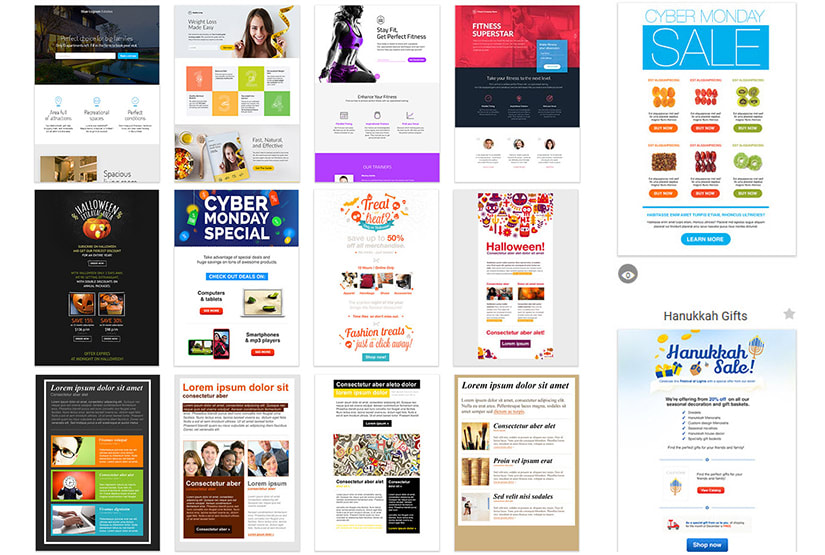
    design getresponse landing page, email template, automation


    Interface

    The user interfaces offered by Getresponse and Mailchimp are quite different – Mailchimp opts for a very minimalistic sort of approach, with lots of big fonts (on big spaces) being employed to present menus, stats and data. It’s quite distinctive and some users will probably appreciate the ‘big and bold’ approach.


    Getresponse, by contrast, provides a user interface that is based more around easy drop-down menus.


    Support Staff

    From my personal experience GetResponse has one of the fastest and most responsive support, which makes sense and approves their name GET RESPONSE, GET it?

    Their Five-Star Customer Success Team is at your disposal. Trusted and loved by 96% of their customers.(The rest 4% is probably Mailchimp spies)

    Committed to your success – 24 hours a day, 7 days a week, in 8 languages, even for free trial customers.


    Verdict

    Mailchimp has been on Market forever and has good reputation at what it does, but problem is that their possibilities are now limited compared to new reveals who offer brand new features and necessary tools for maximum control over your business.

    If you just need basic News Letter Autoresponder with Landing Page, Chimp will be enough for you but with all that fancy features GetResponse wins this competition and there is a very few reason why you would refuse using all these extra tools for completely FREE at the beginning.


    Signup for GetResponse

    Signup for Mailchimp


    A slight off topic

    GetResponse vs clickfunnels


    Comments

    Popular posts from this blog

    Bluehost Shared Hosting vs Liquidweb Dedicated Hosting for WordPress - Should you pay more for Dedicated Hosting ?

    Shared hosting vs dedicated hosting Both shared hosting and dedicated hosting hold the data for your website on a single server. When web users access your website from their browser, this server sends your data to them. The difference between the two hosting types is the type of server on which your website is stored. With shared hosting, your website lives alongside others, which are neighboring users utilizing the same server. With dedicated hosting plans, your website has a server all to itself. There are distinct advantages and disadvantages to both. Learn the difference between  shared hosting and dedicated hosting to choose the best option for your business.

    Wordpress vs Wix - Which one you should choose to create Website (Do they both offer web hosting and web builder?)

    In this article we will discuss which is the best place to get started with your Simple Homepage, E-Commerce/Online Store, Portfolio Website or just a Blog too. Since there are many options and providers which offer you this kind of service, you probably already know that Wix And Wordpress are on the top of Web Design Chain so its more reasonable to start of with this 2 guys. So what is main similarities with this 2 except that they both start with letter W ? In order to answer that question we should start discussing by differences first. First thing you should take into consideration that WP is Website Builder. It does not contain Web Hosting itself, you need to purchase it separately from services who offer WP Hosting, while Wix has it Both at same time. But does it mean its huge advantage? Probably Not.